Abstract
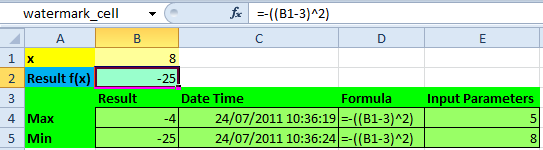
Falls Sie die Extremwerte einer Zelle nachverfolgen oder speichern müssen, hilft Ihnen der hier gezeigte VBA Code. Diese Lösung funktioniert für numerische Werte und Textwerte.
Appendix sbCellWatermarks Programmcode
Bitte den Haftungsausschluss im Impressum beachten.
Sub sbCellWatermarks(rCell As Range, rOutput As Range)
'Keep track of extreme values of a cell calculation.
'Call this sub from a worksheet's calculation event like
'Private Sub Worksheet_Change(ByVal Target As Range)
'    Call sbCellWatermarks(Range("watermark_cell"), _
'            Range("watermark_output"))
'End Sub
'If named range watermark_cell is set to B2 and watermark_output to
'B5:E6 a calculation example could be like:
'    Result  DateTime           Formula       Input Parameters
'Max    0    13/12/2008 12:41   =-((B1-3)^2)  3
'Min   -4    13/12/2008 12:46   =-((B1-3)^2)  5
'Source (EN): https://www.sulprobil.de/sbcellwatermarks_en/
'Source (DE): https://www.berndplumhoff.de/sbcellwatermarks_de/
'(C) (P) by Bernd Plumhoff 24-Jul-2011 PB V0.21

Dim i As Long, k As Long, p As Long, v As Variant

'Check input parameters thoroughly because we will switch off events
If Not TypeOf rCell Is Range Or Not TypeOf rOutput Is Range Then
    Call MsgBox("Input cell or output area are not of type RANGE!", _
            vbOKOnly, "Error")
    Exit Sub
End If
If rCell.Count <> 1 Then
    Call MsgBox("Input range should contain only 1 cell!", _
            vbOKOnly, "Error")
    Exit Sub
End If
If rCell.HasFormula Then p = rCell.DirectPrecedents.Count
If rOutput.Rows.Count < 2 Or rOutput.Columns.Count < 3 + p Then
    Call MsgBox("Output range should contain at least 2 rows and " & _
            3 + p & " columns!", vbOKOnly, "Error")
    Exit Sub
End If

Application.EnableEvents = False

k = Application.Calculation
Application.Calculation = xlCalculationManual
rCell.Calculate

If rCell.FormulaLocal <> rOutput(1, 3) Then
    'If formula changed reset statistics
    rOutput.ClearContents
    rOutput(1, 1) = rCell
    rOutput(2, 1) = rCell
    rOutput(1, 2) = Now
    rOutput(2, 2) = rOutput(1, 2)
    rOutput(1, 3) = "'" & rCell.FormulaLocal
    rOutput(2, 3) = "'" & rCell.FormulaLocal
    If rCell.HasFormula Then
        i = 4
        For Each v In rCell.DirectPrecedents
            rOutput(1, i) = v
            rOutput(2, i) = v
            i = i + 1
        Next v
    End If
ElseIf rCell > rOutput(1, 1) Then
    rOutput(1, 1) = rCell
    rOutput(1, 2) = Now
    If rCell.HasFormula Then
        i = 4
        For Each v In rCell.DirectPrecedents
            rOutput(1, i) = v
            i = i + 1
        Next v
    End If
ElseIf rCell < rOutput(2, 1) Then
    rOutput(2, 1) = rCell
    rOutput(2, 2) = Now
    If rCell.HasFormula Then
        i = 4
        For Each v In rCell.DirectPrecedents
            rOutput(2, i) = v
            i = i + 1
        Next v
    End If
End If

Application.Calculation = k
Application.EnableEvents = True

End Sub
Bitte den Haftungsausschluss im Impressum beachten.
sbCellWatermarks.xlsm [20 KB Excel Datei, ohne jegliche Gewährleistung]
Hinweis: Eine umfassende Dokumentation meiner Excel Implementierungen finden Sie in Excel VBA Eine Sammlung.